
Ode to the Inventory ID
by Dan Tonkovich

I want you to imagine a river. The origin is high in the mountains. Perhaps the water comes from a glacier or pristine alpine lake. The source of this water is beautiful, fresh, and untouched. From that source, the water will flow downhill until it ends up at its terminal; most likely the ocean. During transit, other streams of water may flow into it from other sources. Some water might be pulled out to water crops or cool data centers. At some point, someone might dump a pickup truck worth of trash into the river.
Now imagine standing at the terminal of this now mighty river, taking a scoop and asking, “where did this scoop of water come from?”. How might you answer this question?
Data is the new oil?
Tragically (for all current and former staff), DataSF’s work does not involve hiking to alpine lakes. But we do face a similar challenge every day: tracking data from its source to its destination. It’s critical that we know where all our data is—both at rest and in transit—to fulfill public records requests, ensure consistent analysis, and troubleshoot any upstream issues.
When it comes to tracking water, hydrologists use a low-tech but remarkably effective tool: the drift card. During oil spills, scientists toss these small floating cards into the water and later record where they resurface. Each card has a unique identification number that reveals both where it was released (the source) and where it was found (the terminal).
DataSF uses an equally simple yet powerful method for tracing datasets from their origins to every downstream destination: the Inventory ID.
Lay of the land
Let’s start with our alpine lakes. At last count, the City of San Francisco had 490 systems of record — 490 potential sources feeding data into downstream processes like operations, analysis, reporting, and visualization. To keep them straight, we inventory each system and assign it an identifier. For example, the Film Commission’s permitting system is FLM-0001-S.
Each system ID includes a department code (FLM for the Film Commission), a unique number, and a “-S” to denote that it’s a system. Every dataset within those systems then gets its own ID through a process we call the data inventory — for instance, the Film Permit Report becomes FLM-0002.
Moving downstream
Like the drift cards, these dataset IDs will stay with a dataset as it flows down from the hills, combines with other datasets, and is eventually used in reporting and analysis. Let’s outline this with a simple example: publishing a dataset on the Open Data Portal:
The Fog Report
Let’s pretend that the Department of Fog wants to publish a dataset which reports on what percent of the City is covered in fog each day. Here are the steps we would take, and how the inventory ID plays a critical role in each (this will get a little technical, feel free to just look at the picture).
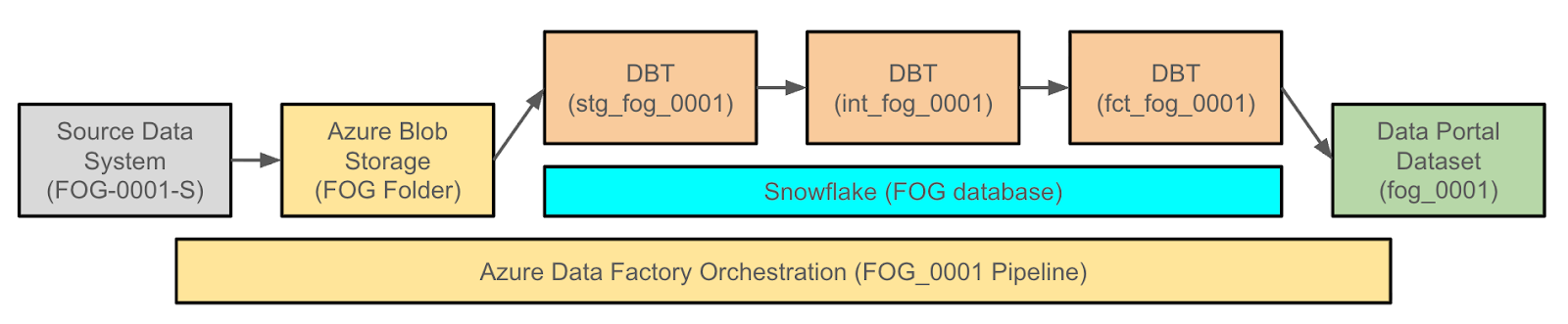
The first thing we do when starting an open production data project is give our dataset an identifier. If it doesn’t have one, we create it. FOG-0001, the Department of Fog’s first entry in the river of data.
Next, we open a ticket in our project tracker (Asana, for the curious), so the dataset can officially enter our world. The ticket is something like “FOG-0001: Fog Report”
Then comes the expedition upstream — finding the source system where the data actually lives. If we can connect directly, great. If not, we build a digital dock — an SFTP folder — where the data can float over safely. Either way, it gets a name worthy of its lineage: FOG-0001-S: FOG Report Database.
From there, the data flows into our storage lake in Azure, labeling the raw file… you guessed it: FOG-0001.
Once the data’s in, we filter out the muck (data cleaning and transformations) with dbt. Every step in the cleaning process keeps the identifier:
Staging: stg_fog_0001_raw_fog_results
Intermediate: int_fog_0001_fog_results_geocoded.
Final table: fct_fog_0001_fog_results
This is all orchestrated in Azure Data Factory with the same ID: FOG_0001.
Finally, the dataset makes its debut on the Open Data Portal. Its Inventory ID comes with it, right there in the metadata — a little tag that tells the story of its entire journey from cloud to clarity.
I can see the sea!
So there you have it: the humble Inventory ID. It may not sparkle like an alpine lake or roar like a rushing river, but it quietly keeps everything flowing in the right direction. It’s our drift card, our breadcrumb trail, our way of knowing where each scoop of data came from and where it’s headed next. Without it, we’d be standing at the delta of the City’s vast data river, shrugging our shoulders and guessing what upstream mystery sent us that CSV.
Instead, thanks to a few well-placed hyphens and digits, we can trace any dataset from source to sea — confident, calm, and only slightly damp. So here’s to the Inventory ID: unsung hero, and perhaps the most special string of characters you’ll ever find in a database.